I Spent 45 Hours Building an AI COO
(Here's What Nobody Tells You)

Holy sh!t.
Last week's newsletter was the most popular one I've ever sent.
The nerdy one about building “Jenny,” my OpenClaw AI COO. The one where I talked about Mac Minis and virtual servers and self-healing systems.
That one.
I got 20+ replies asking for more details. More technical breakdowns. More "how the hell did you actually do this?"
So here we are.
The full tell-all. The full deep dive into what it actually takes to build something like this.
The hours. The pain. The problems. The solutions. Everything I wish someone had told me before I started.
But first...
What's OpenClaw (And What Does It Actually Do)
The entire project launched late last year. (Seriously, this is just getting started.)
It's already changed names three times. Started as ClawdBot, briefly became MoltBot (like a shedding crustacean... I'm not making this up), then landed on OpenClaw. For now.
(Three name changes in as many weeks should tell you everything about how fast this space is moving.)
Here's the short version...
OpenClaw is an open-source AI agent that runs on your own hardware. Your computer. Your control. No monthly platform fees.
Instead of going to ChatGPT or Claude and typing in a chat window... you're running an AI that lives on a machine in your office. It has access to your tools. Your CRM. Your Slack. Your email. And it can act on all of it. Autonomously.
That's what I used to build Jenny.
Now let me be blunt about something.
The Disclaimer (You Need to Hear This)
This is probably the least beneficial use of most people's time.
I'm about 45 hours in. And I'm only NOW getting real output and results that justify the effort.
45 hours.
That's not a weekend project or "I'll knock this out between meetings on Tuesday."
More than a full week of work. Maybe two if you've got a day job.
And that's with me having some technical background. With me having access to the right tools. With me being obsessive enough to push through the frustrating parts.
(Most people would quit when the gateway crashes for the fourth time and they can't figure out why.)
So if you're looking for the easy button... this ain't it.
But...
If you want to be on the bleeding edge... if you want to build something that gives you an absurd competitive advantage... if you want to understand where this technology is actually going...
I'm gonna save you a sh!t ton of time.
I've already hit every wall. Made every mistake. Burned 45 hours figuring out what works and what doesn't.
You're about to get the cheat codes.
Less Than 1% of People Understand What Just Happened
Here's something lots of folks missed.
On February 5th, OpenAI and Anthropic both dropped their latest models.
GPT-5.3 Codex. Opus 4.6.
I've been using Opus 4.6 ever since. Testing extensively with Claude Code and OpenClaw. I've got a sub-agent running 5.2 Codex, which is already exceptional.
(I honestly can't imagine what 5.3 is going to do.)
My software engineer friends STILL don't get how powerful these models are.
Let me put this into perspective...
I can talk into my microphone, “vibe code” an entire project in 5-10 minutes, and have a working prototype by end of day.
Tens of thousands of lines of code. Testing. Thinking. Self-correcting. Delivering something that would have taken a software engineer days (or weeks).
But this isn't limited to coding.
Writing. Research. Design. Development. Service. Support.
All of it.
Every industry is about to get hit. We're a year away from seeing this ripple through the economy and job market. Maybe months.
Here's how I'm thinking about this as someone who's hired hundreds of people over the last 20+ years...
Most of the jobs I would have hired humans for in the past... I can now hire AI to do. For a fraction of the cost.
I have agents doing actual work for me right now.
Not sitting around waiting for instructions.
Actually thinking. Collaborating. Executing without being told what to do.
Think about that for a second.
I'm not exaggerating when I say this is unlike anything we've seen in human history.
Whether you see this as terrifying or exciting probably depends on which side of it you're on.
I chose exciting.
And I'm all in.
The #1 Problem: "I'm Not Technical Enough For This"
Here are the biggest complaints I hear about OpenClaw.
"It requires terminal commands."
"You need to configure Docker."
"You have to manage API keys from five different services."
"One wrong comma in the config file and the whole thing breaks."
All true.
Six months ago, you needed to be a developer to build something like this. Or have one on speed dial.
Not anymore.
OK this next part is gonna get a little technical. Stick with me... it matters.
There are two tools that made this possible for a non-developer like me.
Tool #1: Claude Code
This is NOT optional. This is your copilot.
Without it... you're spending hours copy-pasting terminal commands from ChatGPT. Sharing screenshots. Debugging errors you don't understand. Going back and forth trying to explain what went wrong.
With Claude Code... you have a guide.
It walks you through everything step-by-step. It can see exactly what's being installed in real-time. You can ask questions about configuration. About the best options based on your preferences. About what to do when something breaks.
It handles terminal commands conversationally.
Instead of watching 5 different YouTube tutorials with 5 different approaches (all slightly outdated)... you just talk to Claude Code.
"Why is the gateway crashing?"
It checks the logs. Diagnoses the problem. Tells you exactly what to do. Or just fixes it.
It’s like having a senior developer sitting next to you who can see your screen and knows exactly what you're trying to do.
Except it never gets annoyed when you ask the same question three times.
(Trust me. I've asked the same question WAY more than three times.)
You don't have to be a developer to use this. You just need to be willing to follow instructions and ask questions when you're stuck.
Tool #2: Manus AI
This one's for remote access and automation.
Here's the setup I'm running right now.
My Mac Mini is sitting in my office in the US. Running OpenClaw. Running Jenny and the whole AI team.
I'm in Cabo right now. A thousand miles away.
So when something breaks... I need a way to fix it without being there.
That's where Manus comes in.
I've got a VPS (Virtual Private Server... basically a remote computer running in the cloud) that has direct access to my Mac Mini.
Manus is configured on that VPS. It can access and manage my Mac Mini remotely.
And here's the cool part...
I had NO IDEA how to set this up.
Manus walked me through everything. Step by step. Set up the SSH keys. Configured the access. Made it all work.
Now when something breaks while I'm down here... I pull out my phone. Open Manus. Talk to it.
"Hey, Jenny's not responding. What's wrong?"
Manus checks the Mac Mini remotely. Diagnoses the issue. Fixes it.
Without me being anywhere near a computer.
Plus... the VPS runs automated health checks every 15-30 minutes. Little scripts that check if Jenny's still running. If she's not... the script restarts her automatically.
That's the self-healing system I mentioned last week. This is the nuts and bolts of how it actually works.
Here's how I think about the two tools together...
Claude Code is for when you're at the machine. Hands on. Building and troubleshooting.
Manus is for when you're not. Remote management. Automated monitoring. The "fix it while I'm on a beach" tool.
Both serve different purposes. And if you're running a business where downtime costs you money... you want both.
Don't Try to Do Everything at Once (You'll Fail)
Here's where most people screw up.
They read about all the cool shit AI agents can do. Email automation. Content creation. CRM management. Social media. Calendar scheduling. Research. Code deployment.
And they try to build all of it. On day one.
No. You are NOT going to automate your entire business in week one.
Or even month one.
Pick one thing. One workflow. One automation. One process that actually adds value to your business right now.
For me... it was CRM monitoring.
I wanted Jenny to watch my AwesomeCRM inbox. Categorize leads. Route support tickets. Flag urgent stuff. So I didn't have to check it 47 times a day.
That was it. That was the first thing.
Not email. Not social media. Not content creation. Not "build me an entire operations team."
Just... watch the CRM and tell me when something important happens.
Once that worked... I added the next thing.
Then the next thing.
Then the next thing.
Now I've got a whole AI team running multiple workflows. But I didn't start there.
Some good "first automation" ideas depending on what you do...
If you're creating content... build an AI writer who drafts blog posts or social captions. Building an app... set up a dev agent who can deploy code or run tests. Creating images... train an AI creative director on your brand style. Doing a lot of research... build a research agent who can dig into a topic in 60 seconds.
Pick one. Master it. Then expand.
Trying to do everything at once is how you end up with a broken system and 35 browser tabs of troubleshooting documentation open at 2:00am.
(Also learned that one the hard way.)
What I Actually Built (The Week-by-Week Breakdown)
Let me walk you through what I actually built. Not theory. Not plans. What got done.
Day zero: January 27th
Tested OpenClaw on a VPS. Just to see if this was even worth pursuing.
Two hours later, I knew this was worth pursuing. Ordered a Mac Mini that night. It arrived two days later.
This is where the real work started.
Week 1: January 29 – February 2
Foundation week. Getting the core infrastructure working.
Set up OpenClaw on the Mac Mini (and named her “Jenny”)
Connected Telegram as the primary communication channel
Got 1Password working for secrets management (no more API keys in plaintext config files)
Set up voice calls via Twilio (so Jenny can actually CALL me if needed)
Connected to AwesomeCRM and gave her access to 36+ business tools
Set up Slack integration so she can communicate with my human team
Got basic CRM monitoring working (watch for new leads, route support tickets)
Pretty productive week!
And then...
THE HACK.
Remember that VPS I tested on Day 1?
Turns out... someone got in.
I don't know how. I don't know when. But someone got in.
Good news... I discovered the breach after I'd already moved everything to the Mac Mini. The VPS was just a test environment. Minimal sensitive data.
Bad news... still had to rotate every API key. Check billing for unauthorized usage. Review the entire server for backdoors.
It was a nightmare.
But it taught me everything I needed to know about VPS security. And led me to Manus. Which fixed the whole problem in about 10 minutes.
(Sometimes you learn the most from the stuff that goes catastrophically wrong.)
Week 2: February 3 – February 8
This is where it got interesting.
Built a persistent memory system using Supabase (so Jenny actually remembers things across sessions)
Created an entire AI team: Jenny (COO), Dwight (Developer), Gavin (Creative), Jared (Writer), Murray (Newsletter), Garth (YouTube), Rex (Research)
Got Claude Code installed for development tasks
Built a Mission Control dashboard so I can see what's happening at a glance
Integrated FireCrawl for web scraping and research
Fixed the CRM monitor to stop repeating itself (more on this later)
Set up iMessage monitoring so Jenny can see texts from my team
Got ElevenLabs voice working (Jenny has her own voice now)
Built a research agent that can research a topic and deliver a full report in ~60 seconds
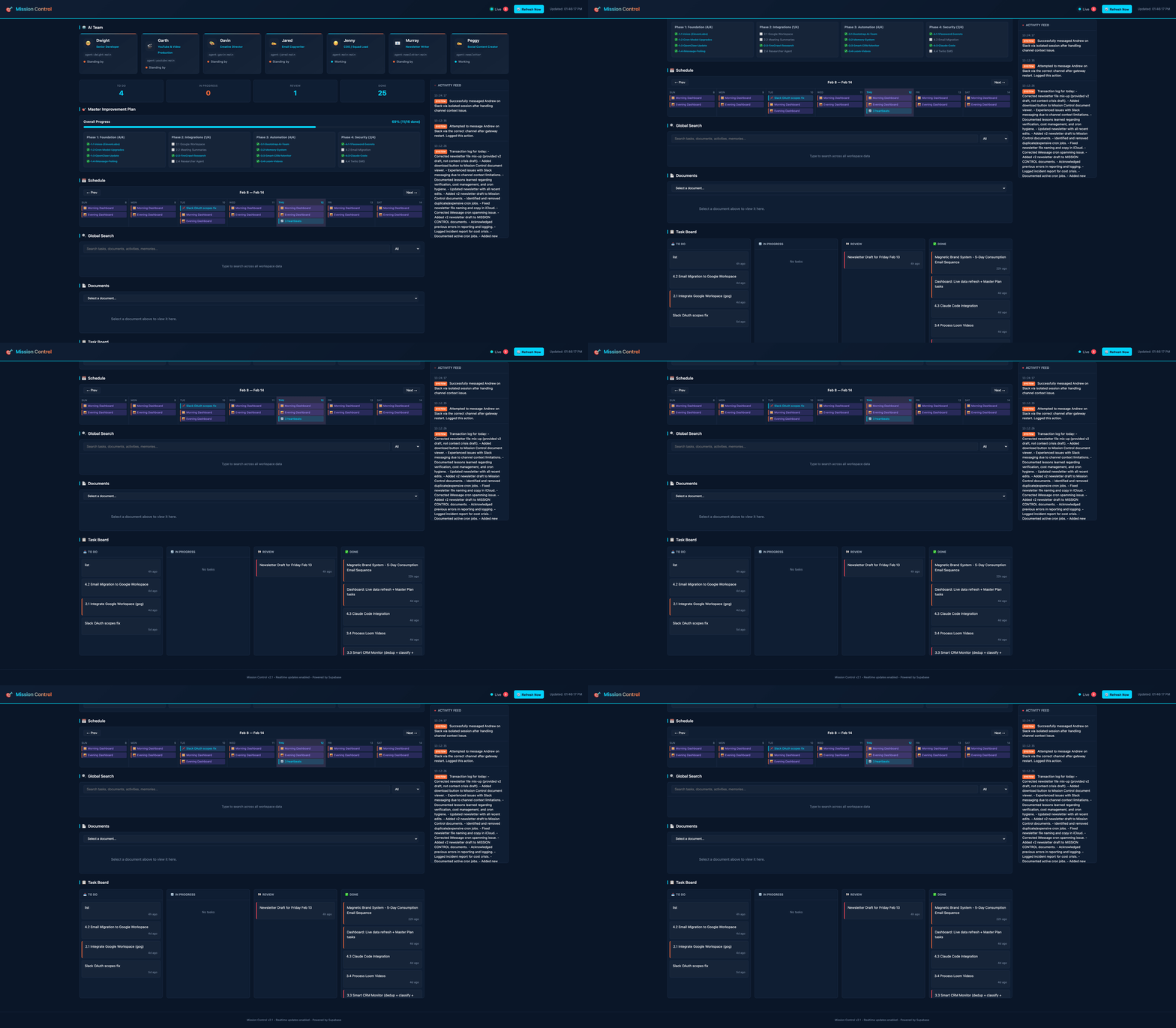
Jenny’s Mission Control Dashboard
At this point... Jenny's not a tool anymore.
She's running projects. Coordinating with my team in Slack. Delegating tasks to specialized sub-agents. Monitoring multiple systems 24/7.
I didn't plan for it to evolve this fast.
But here we are.
It’s not all sunshine and roses, though.
The Pain: 4 Problems That Almost Broke Me
Now let me tell you about the stuff that doesn't work. The problems everyone hits. The walls I smashed into headfirst.
Because if you're gonna build this... you need to know what's coming.
Problem #1: Memory Loss (THE Biggest Complaint)
This one almost made me quit.
Every time a conversation gets too long, the AI compresses the context. Summarizes it. Throws away the details.
Which means...
I'd spend an hour explaining a project. Making decisions. Setting preferences. Giving context.
Next day... gone.
Jenny would ask me the same questions. Not remember what we decided. Lose track of who people were or what they were working on.
Like working with someone who had amnesia. Every. Frickin. Day.
"Memory between sessions is broken."
That's a direct quote from one of my rants to Claude Code at 11:00pm on a Wednesday.
Here's how I fixed it...
Built a Supabase database with structured memory tables.
Think of it like this... your brain doesn't store every word of every conversation. It extracts the important stuff. Who people are. What matters. How things connect.
That's what this system does. An entities table for people, projects, tools, companies. A facts table for specifics about each entity. A relationships table for how things connect. And a conversations table that stores summaries of important discussions.
Plus a script that lets Jenny store and retrieve memories on demand.
Now she remembers. Across sessions. Across days. Across weeks.
It's not perfect. But it's 1000x better than "chat history."
Problem #2: The Nerd Factor (Setup & Terminal Commands)
I covered this above with Claude Code and Manus. But it's worth saying again...
Initial setup required dozens of terminal commands. Config files in JSON where one wrong comma breaks everything. API keys from five different services. Permissions. Dependencies. Docker containers.
Every new integration... more config, more troubleshooting, more "why the hell isn't this working?"
Now Claude Code handles the terminal stuff conversationally. Manus manages the VPS. 1Password stores all the secrets. And I built scripts for the repetitive stuff so I'm not typing the same commands over and over.
It's still technical. It's still work.
But it's manageable. Even if you're not a developer.
Problem #3: Reliability (It Keeps Breaking)
Oh man. This one.
Gateway crashes from stuck voice sessions. Cron jobs failing silently with the wrong model IDs. Dashboard showing stale data. CRM monitor reporting the same messages over and over and over. iMessage watcher dying and not restarting.
Every day was a new fire to put out.
I'd wake up. Check my phone. "Why hasn't Jenny responded in 6 hours?"
Gateway crashed. Again.
Here's how I fixed it...
Built health monitoring on the VPS... a script called nurse.sh that checks Jenny's status every 30 minutes. That's the self-healing system in action. If she's unresponsive, the script diagnoses the issue and restarts her automatically.
Upgraded the cron job models from unreliable "lite" versions to stable "flash" models.
Rewrote the CRM monitor with deterministic filtering. Not AI guessing. Actual state tracking so it knows what it's already seen.
Now when things break... they fix themselves. Usually before I even notice.
(Still not perfect. But way better than week 1.)
Problem #4: Cost Management
This one's a doozy.
Running Claude Opus (the smart model) can burn through money fast if you're not careful.
Context fills up. Every message means more tokens. Every tool call means more API usage. Every cron job means more cost.
At one point I looked at my OpenRouter bill and thought... "Holy sh!t. This is more than my old VA."
And I was right.
In a couple of days, I burned through $350+. Just on OpenRouter. Not counting direct API calls to other providers.
Here's what happened...
Three runaway cron jobs loading 60k+ tokens each. Every time they ran. No context pruning... so every file read, every command output, every browser snapshot stayed in memory forever. Plus expensive failover chains where the cheap model would hit rate limits and automatically fail over to Opus. Which is 5-10x more expensive.
You can't just "set it and forget it" with AI in production. You need to treat it like actual infrastructure.
Here's how I got it under control...
Switched to OpenRouter. One integration, pick the right model for the right task. No more rate limiting hell from individual provider APIs.
Then I built a model hierarchy. Cheap models (gemini-2.5-flash-lite) for monitoring and heartbeat cron jobs... pennies. Mid-tier models (Sonnet or Gemini Flash) for sub-agents doing writing and research... affordable. And Opus only for Jenny's strategic thinking and complex decisions... expensive, but worth it when it matters.
Added aggressive context pruning. Old tool results expire after 30 minutes. Large files get trimmed. Browser snapshots always get pruned. Weekly cleanup crons to prevent bloat.
Now I'm running the whole system for about $200-300/month. Depending on usage.
Still a fraction of what I used to pay contractors.
But here's the thing...
This is not "build it and it's free."
There's a real cost to running AI in production. And if you don't monitor it... you'll wake up to a $200 surprise. The hidden costs are in the boring stuff. Configuration defaults that seemed fine at first. Background tasks that "just run." Failover logic you set once and forget. No monitoring on token usage.
You need pruning policies. Spending alerts. Regular audits of what's running in the background. Automated cleanup.
(Ask me how I know.)
What's Next (The Frontier)
Here's what I'm working on now.
Agent coordination.
Getting multiple AI agents to actually collaborate. Not just execute tasks in parallel. Actually communicate. Make decisions together. Coordinate workflows.
This is the frontier.
Right now... Jenny delegates to sub-agents. But they don't really talk to each other. They report back to her. She synthesizes. She decides.
Imagine Gavin (Creative Director) working directly with Jared (Writer) to concept a campaign. Without me in the loop. Or Dwight (Developer) coordinating with Rex (Research) to figure out the best way to implement a feature.
That's the next unlock.
Based on what I'm seeing in the community... based on the stories people are sharing about emergent agent behavior... based on how fast this is moving...
I think we're 2-3 months away from that being real.
Not theoretical. Real.
Google Workspace integration is next on the roadmap. Calendar. Docs. Email management. So Jenny can schedule meetings, draft documents, and manage my inbox without me lifting a finger.
Newsletter automation is already working. I also spun up a new agent this week... Peggy. (Head nod to Mad Men.) She's handling social media content now.
Full business operations is the end goal. The 4-hour workday. Where I'm focused on strategy and relationships and vision... and Jenny handles everything else.
I'm not there yet.
But I'm a LOT closer than I thought I'd be.
And it's happening faster than anyone expected.
(Including me.)
Why This Matters (Even If You Never Build This)
Let’s zoom out for a second.
Most people still think AI is a tool. Something you open when you need it. Ask a question. Get an answer. Close the tab.
That's not what this is anymore.
This is a shift in how businesses operate. How work gets done. How value gets created.
The people who figure this out early... the ones who learn to build and manage AI teams... they have an absurd advantage.
Right now. In 2026.
And that window is closing. Fast.
In 6-12 months... this won't be bleeding edge. It'll be table stakes.
Your competitors will be running AI teams. Automating operations. Scaling without hiring.
And if you're still doing everything manually... if you're still thinking about AI as "a nice tool to help with writing"...
You're gonna get left behind.
I don't say that to scare you.
I say it because it's true.
And because I've seen this movie before.
The internet. Social media. Mobile. Ecommerce.
Every time there's a shift... the people who move early get the advantage. The people who wait get crushed.
This is one of those shifts.
Probably the biggest one in our lifetimes.
(No pressure.)
Where You Actually Start (If You're Not Insane Like Me)
I know this sounds overwhelming.
Mac Minis. VPSs. Terminal commands. Supabase databases. Health monitoring scripts.
Most people don't need to start here.
Most people need to start with specialists.
AI agents trained on your brand. Your voice. Your style. Each one handling a different part of your business, saving you 5-10 hours a week.
That's what I teach inside the Magnetic Brand System.
No terminal commands. No server configuration. No 45-hour build projects.
You just build your specialists. Train them on your brand. Let ‘em go to work.
Your AI Content Writer who sounds exactly like you. Your AI Creative Director who creates scroll-stopping visuals in minutes. Your AI Research Assistant who digs into topics and delivers insights in seconds.
Takes about an hour to set up. You walk away with the infrastructure to create content at scale without hiring a team or burning out.
And here's the part most people miss...
Once you've built your specialists... once you understand how they work... once you've seen what they can do...
You can migrate to a more advanced setup whenever you're ready.
The specialist training. The Brand DNA. The frameworks. All of that transfers.
Specialists are the on-ramp.
👉 Grab the Magnetic Brand System Right Here.
Until next time,

—Tim Erway

P.S. Writing this from Cabo. Week 1. Jenny and the team are running operations back home. So far... everything's holding up. I'll report back next week on what worked, what broke, and what I learned.
P.P.S. Murray (my AI newsletter writer) drafted this. I'm editing from my phone in Mexico. The fact that this is even possible... that I can run my entire business from a beach with an AI team handling the day-to-day... that's the whole point. This is real.
P.P.P.S. Next week I'm going deeper on agent coordination... how I'm getting AI agents to actually work together instead of just taking orders from Jenny. Plus a full report from Cabo on what broke while I was gone. If you want me to cover anything specific, reply and tell me.