Field Report: The Most Productive Two Weeks I've Had (and What It Really Cost)
About 90% of it happened by talking to my agents... and I wasn't face down on the keyboard at the end.
Four live events. Three complete campaigns. Four slide decks. Three funnels with full email sequences.
Plus a new project dashboard, a members website, and a launch I'm coordinating with a human team.
That's the last two weeks.
Normally that's the kind of two weeks that ends with me face down on the keyboard. This time... I could keep going.
About 90% of what I built happened in voice conversations with my Grok Bot team.
I talk. We work through what needs to happen. The agents build, organize, and coordinate the work. I can see where things stand without logging into a bunch of software and remembering where the hell everything went.
I've never been so productive without being completely stressed out.
Here's what's getting built, with prompts you can steal for your own projects.
Everything has a place now.
The new dashboard holds every project and every piece of work the agents create. Drafts, decks, pages, emails... one place to find it all.
A finished draft doesn't help much if finding it requires remembering which conversation it came from.
“That thing the agent made Tuesday” is a terrible filing system.
Now I have a place to look across the work, see what's moving, and get to the actual thing.
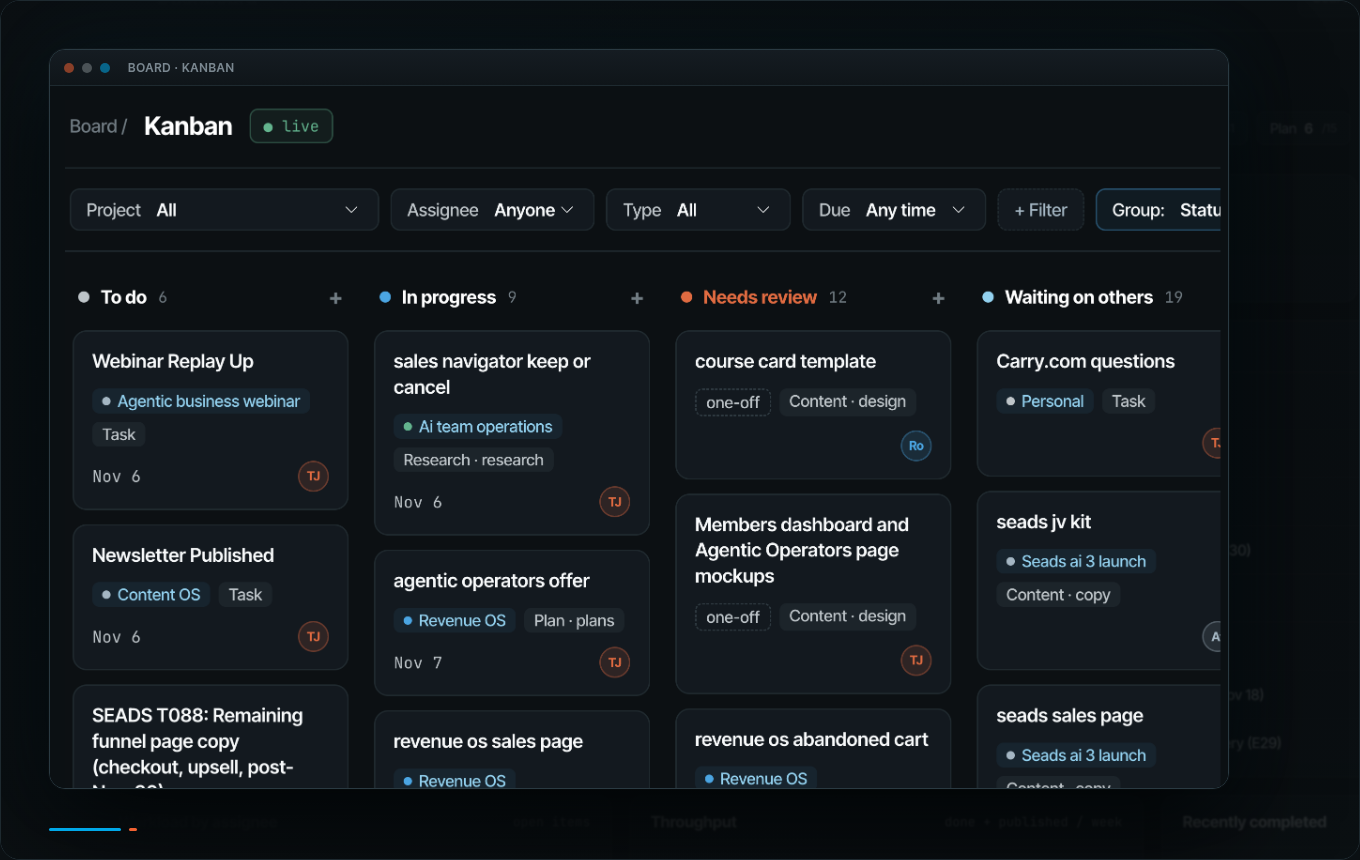
Dwight, my CTO agent, built it on my Mac mini. Underneath it is my Obsidian folder, where all my agents save everything. Documents, images... all of it. The dashboard is a page on top of that folder so I can find and manage the work.
I can also click “Handoff to an Agent,” pick an agent, and kick off the task in Grok Bot.
The Kanban is the feature I use most. I can add tasks fast, assign them to anyone on the team, and drag and drop everything.
Start with an Obsidian folder where your agents save their work. Give your builder agent access to it and your Business Brain, then use this to kick off your own dashboard. It'll need access to the files and somewhere to run the page, like Dwight did:
Dashboard kickoff prompt
Read my Business Brain and the Obsidian folder where my agents save their work.

Ask what I'm actively working on. Help me organize the project files in that folder, then build a dashboard page on top of it. Explain what access and setup you need to make the page work on my computer.

List each active project with:
- Current status.
- Next action.
- Owner, human or agent.
- Due date.
- Links to every related draft, deck, page, email sequence, and other file you can verify.

Also build a drag-and-drop Kanban view. Let me add a task in one step and assign it to a teammate, human or agent. Use exactly these columns: To do, In progress, Needs review, Waiting on others, Done, Published. Include filters by project, assignee, and due date.

Put blocked items and decisions waiting on me at the top. Mark missing information as unknown and ask me for it. Do not invent owners, deadlines, status, or links.

Show me the first version for review and propose how we'll keep it current. Ask before changing any outside system.

No sending, spending, or publishing without my explicit yes.
Review what comes back. Especially the next actions. A page full of project names with no idea what happens next is just a prettier way to feel behind.
I'm back at AttractionMarketing. With humans.
I'm also back in the thick of things at AttractionMarketing, the company I stepped away from last year. I'm coordinating a launch with an actual human team now.
They run everything in monday.com, the project management app the team lives in.
I hate monday.com.
The good part is I never log in.
Anything assigned to me in monday.com lands on my board. I've got the whole launch laid out as a funnel map. Click a step and its tasks and deadlines open up, with links to the work. The copy, plans, and assets live in Google Docs, all connected.
To update anything, I talk to my agent.
I don't log into monday.com. My agent does.
Grok Bot talks to monday.com, and Jenny, my COO, runs the sync every hour, Monday through Saturday, 9am to 7pm. When something changes in monday.com, the dashboard updates on that routine.
And my agents coordinate directly with the human team.
The humans can keep working where they already work, and I can stay on top of my part without moving into the software with them.
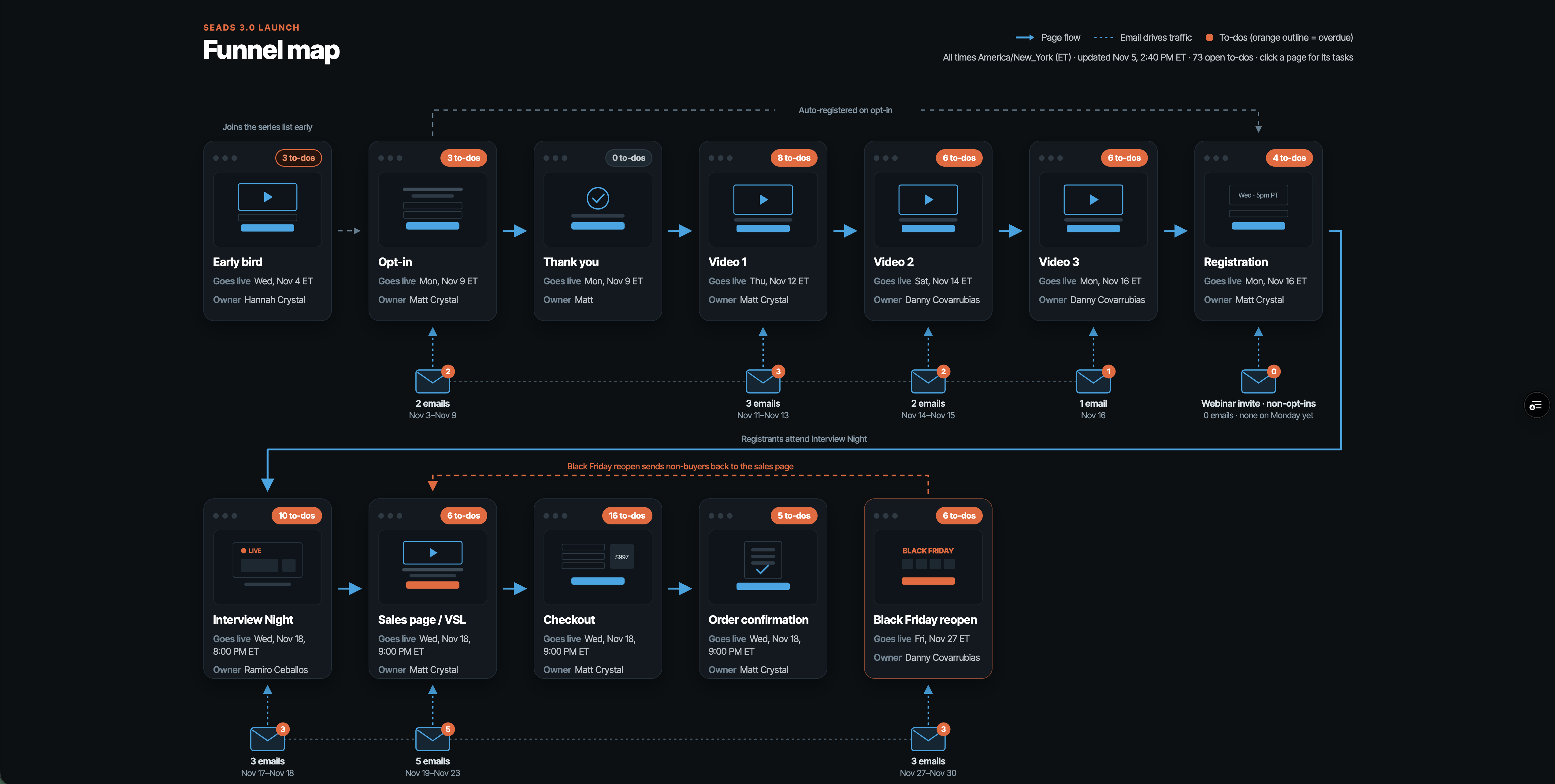
The part to copy is the overview. Start with one project where you need to see the tasks, the people responsible, and the work itself together.
Steal this for the project you're already running.
You can use this approach with ClickUp, Notion, Asana, or whatever your team already uses. Grok Bot has connectors for most project management tools. Ask your agent to walk you through connecting yours.
Or use Composio. One connection gives your agent access to 1,500+ apps, without fiddling with API keys, those strings of code apps use to grant access.
First, connect the project management tool to your agent. Keep the initial job to reading and organizing the project so you can review what it understands.
Second, replace the brackets below and paste the prompt.
Project overview prompt
Read my [ClickUp/Notion/Asana] workspace for [project]. Use the connection we've set up. Tell me if access is missing.

Build a single-page project overview with every task grouped by phase. Include:
- Task name.
- Owner.
- Due date.
- Status.
- A direct link to the original task.
- Links to its related assets.

Flag overdue and blocked items at the top. Pull everything assigned to me into a separate "My plate" section, with the next action for each item.

Flag missing or conflicting information. Do not invent deadlines, owners, dependencies, or status.

Show when you last checked and how to refresh the page.

Ask before changing anything in the project management tool.
Third, review the page. Open a few task links. Check the dates and owners. Make sure “My plate” actually reflects your plate before you start issuing updates from it.
Then you can talk to it in ordinary language. Here's an example to adapt to your own tasks:
Update by talking prompt
Mark the email sequence task done, move the webinar deck due date to Thursday, and tell me what that pushes.Have the agent show you the exact tasks, dates, and proposed changes before it writes anything back. You set what the agent can change and what needs your yes, same as with people.
If the overview is useful, you can also ask for a short briefing when you start work:
Assigned to me briefing prompt
Read the connected project workspace and give me an "assigned to me" briefing for today.

Show overdue work, work due today, blocked items needing my decision, and my next actions. Link each item to its original task and relevant assets. Include when you checked the workspace.

Keep it short. Flag missing information. Do not change tasks, contact anyone, or set up a recurring automation without my approval.
Start by requesting that briefing yourself. Decide whether it's useful before asking the agent to help make it a daily routine.
The campaigns got built, too.
Three campaigns, four decks, and three funnels with email sequences, built over these two weeks, mostly by voice.
I work through the offer with my team, then we build the copy, deck, and emails as we go. I can talk through the next piece and find it with the rest of the campaign when it's ready... less chasing things down.
This is what Revenue OS is for. A marketing department in a folder, with the instructions for working through that sequence.
Keep the campaign together. Give the agent the approved offer and the work already done when you ask for the next piece:
Next campaign piece prompt
Read the approved offer and finished pieces for [campaign]. Draft [next piece] using those files and my Business Brain. Flag anything that conflicts with the approved offer or needs my input. Save the draft with the campaign and link it from the project overview. Show me before publishing anything.Otherwise you can build a lot of stuff very quickly and still have to figure out which email belongs to which funnel. I'd prefer my newfound productivity didn't come with a scavenger hunt.
I also vibe coded a membership site.
The new Agentic Operators members site at access.timerway.com was built by talking to agents, too.
Members log in and grab their setup prompt with their own key already built in.
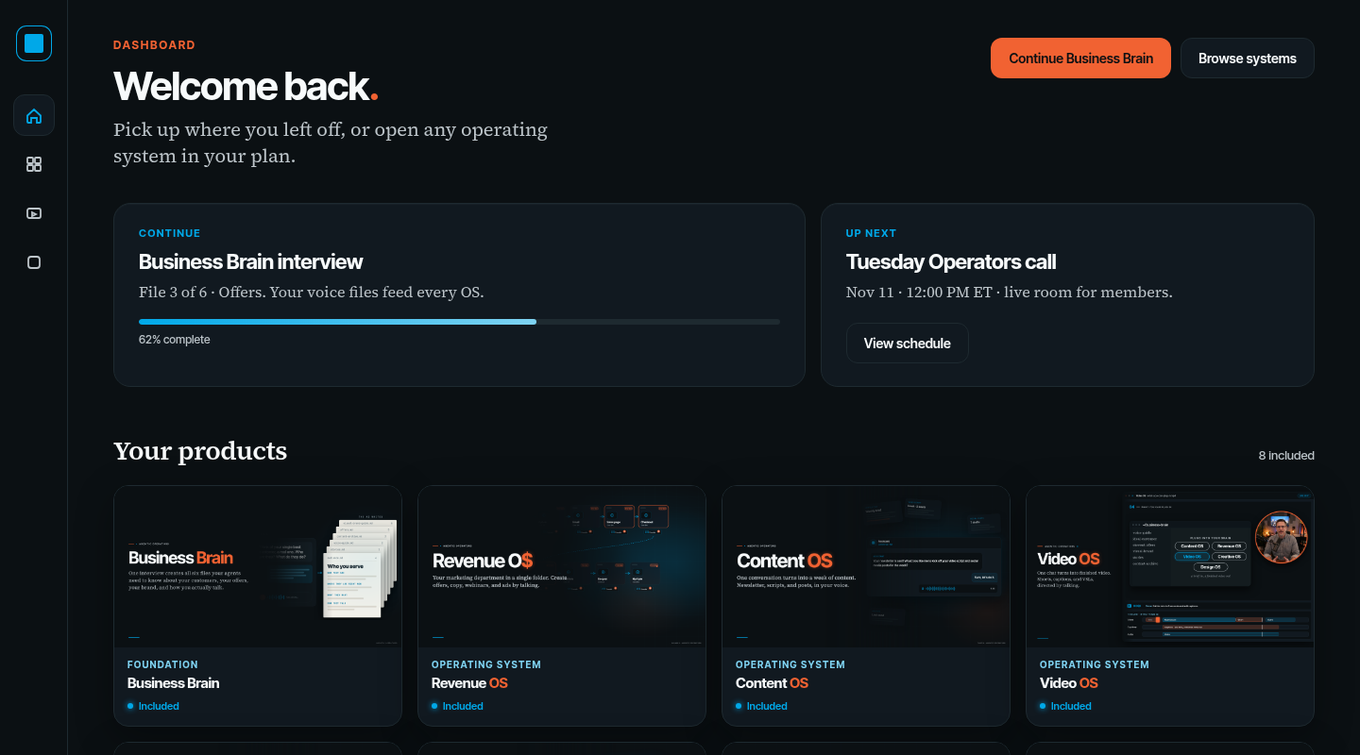
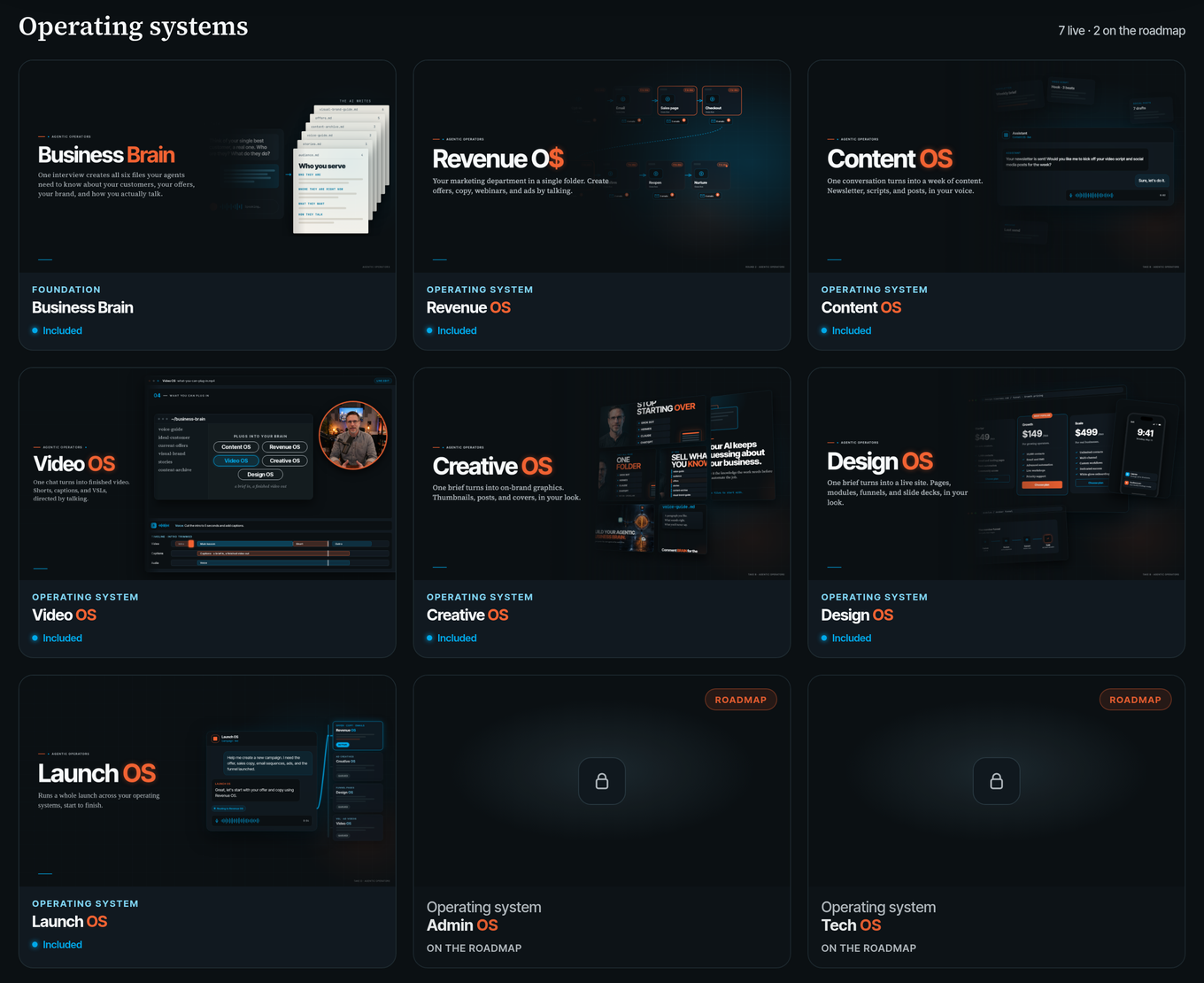
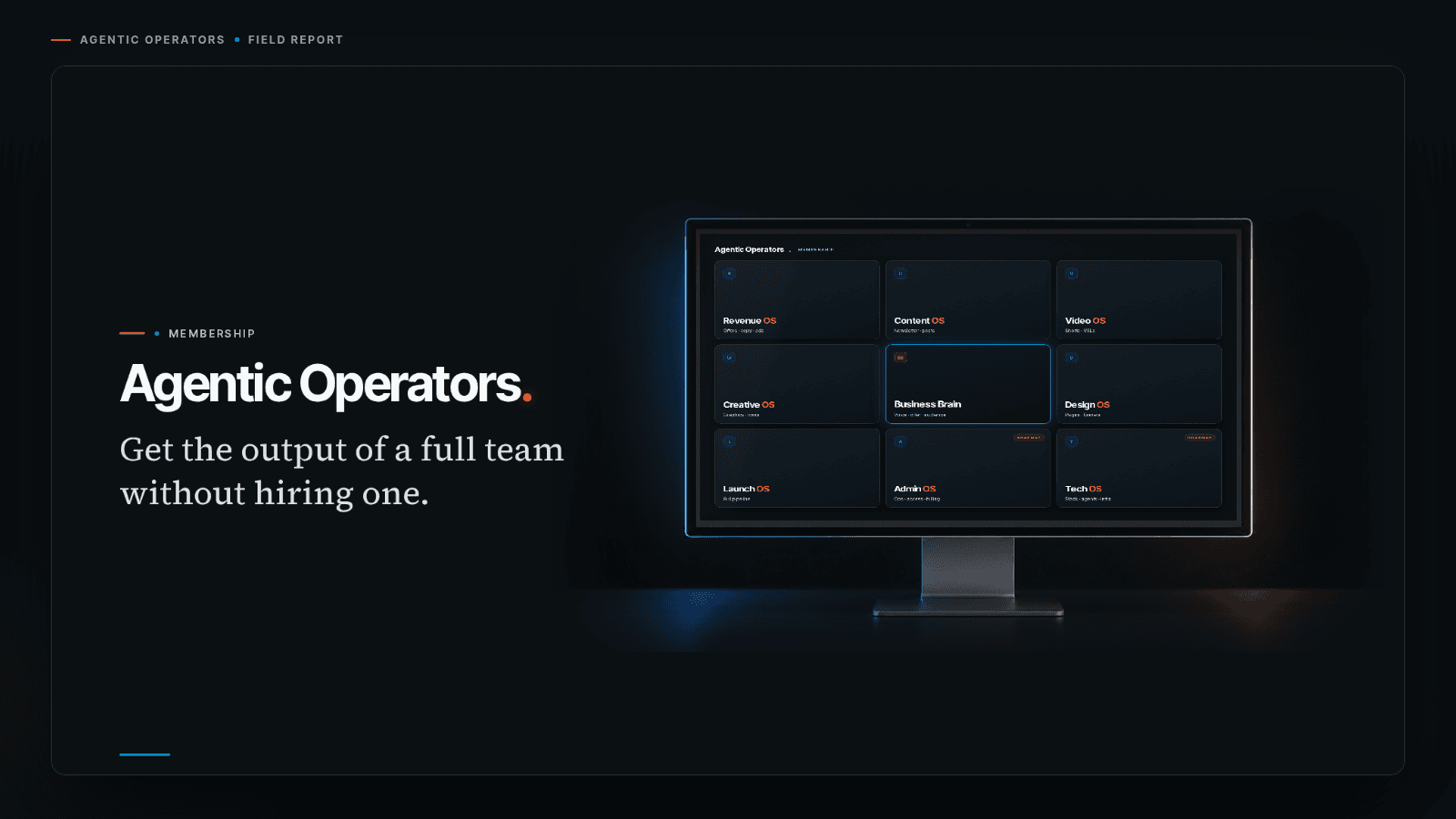
Agentic Operators is launching soon, and it's becoming my flagship offer. It's where I teach you to set up an army of agents like this, with the Business Brain and the operating systems that give each one a job.
Grab the free Business Brain at timerway.com/brain and you're also on the Agentic Operators waitlist. You can start with the foundation while I get the rest ready.
Talking through those member steps keeps me focused on what people need to do when they get there. That's a lot less stressful than trying to hold the whole build in my head.
Before your own build, give the agent three things. First, what the member does when they arrive. Second, what they need to leave with. Third, how you'll check that it works. Have the agent turn that into a build plan you can review before it starts.
Okay, now the honest part.
I moved completely from Hermes to Grok Bot almost a month ago. At first, everything was great.
Then last week my usage jumped about 400%.
Four hundred percent.
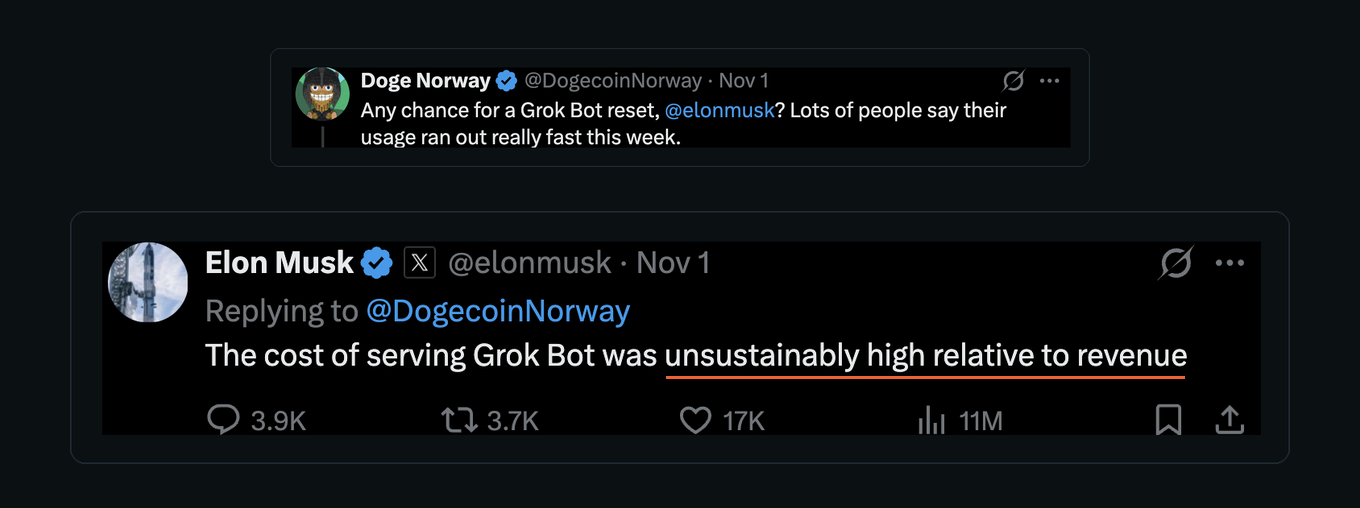
And it wasn't just me. In his reply to @DogecoinNorway on X, Elon addressed a request for a reset after people reported running out of usage quickly that week:
“The cost of serving Grok Bot was unsustainably high relative to revenue”
—Elon Musk, Nov 1, 2026
So I upgraded to Ultra, the $200/month plan open to anyone on Grok Bot.
At this rate, I'll likely run out before the weekly reset. I may spend a couple hundred extra on usage.
I'm not complaining. I've got 14 agents right now, and I'm hiring two more engineers this week. Also agents.
Dwight is already my CTO, and Gilfoyle is my backend engineer. Ron, my CEO agent, is hiring a frontend/UI engineer to handle what members see and use, plus a QA/DevOps engineer to test the work and keep it running. They're kicking off the new members hub this weekend. Next week: database infrastructure and triage, a Watchdog bot.
At the start of this year I had no idea what an engineering team looked like, let alone which roles to hire. Now my CEO and CTO advise me on the next hires, run onboarding, and write each role and its goals.
And I'm hiring because things are moving too slowly for me. Apparently this is who I am now.
A comparable human team doing this level of work would cost me well over $100,000 a month in labor. I know because one of my companies has an even larger team, and the payroll far exceeds that.
A few hundred bucks in extra usage. Versus a six-figure monthly payroll. I'll take that trade.
The agents still make mistakes. Even with the Business Brain and every operating system installed.
They'll ask me questions that are already answered in the files, or that they could research themselves. Small stuff... but annoying.
Gavin, my creative director agent, made several great OS cards after one or two revisions each. Then he had a brain fart and handed me a shitty cartoony computer with text that didn't even line up with the screen. It was pretty bad... apparently agent team members have "off days" too.
I've also connected both my ChatGPT and Claude subscriptions to Grok Bot. Some models do some jobs better, so the agents pick the best model for the task. This letter is an example: GPT wrote it and Claude reviewed it.
You still invest in agents like team members. Clear assignments. SOPs, the written instructions for repeatable work. Frameworks. Workflows. Examples of what good looks like, and a clear point where they need to stop and ask.
Give somebody a vague job, leave out information they need, and never show them what finished looks like... you're setting them up to disappoint you. Agents fail for a lot of the same reasons new hires do.
I've managed people for 25 years. A lot of that carries over, which I wrote about in How to Run Your Business With AI Agents: What 25 Years of Managing People Taught Me.
Give them the same structure you'd give employees, and it's amazing what they do. That's the part I'm teaching inside Agentic Operators... setting up the team and giving each agent what it needs to do the job well.
Agents cut the managing, but they don't remove it entirely.
Every agent needs to know the business.
None of this works very well if I have to explain my business from scratch every time an agent gets an assignment.
That's the Business Brain's job. It's the shared orientation every agent reads, and it powers every operating system in the Agentic Operators stack.
The project instructions tell the agent what we're doing. The brain gives it the business information it needs to do that work properly.
The agents aren't the hard part. Getting them the right knowledge is.
It works with Claude, ChatGPT, Hermes, Cursor, or Grok Bot, which is what I'm using now. You can get that foundation in place before you try to build everything I just showed you.
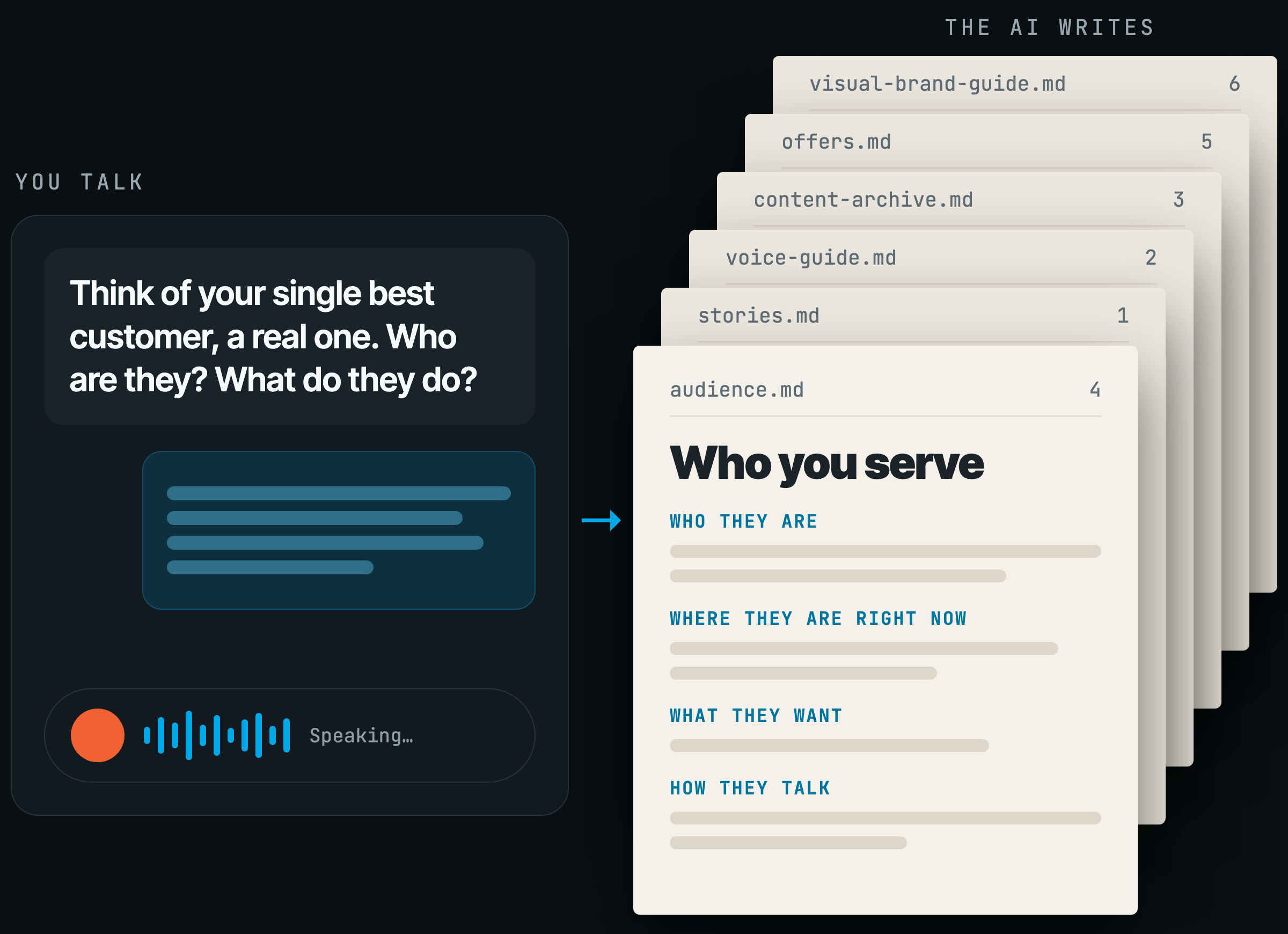
Get AI to actually know your business.
Start with the free Business Brain, the foundation for Agentic Operators. Opt in, and you get the Brain right away plus a spot on the Agentic Operators waitlist.
This week, pick one project. Connect your project management tool, run the overview prompt, and review the page it gives you.
Hit reply and tell me what you connected.
Four live events and all that other work would normally leave me face down on the keyboard. This time I can talk to my team, see where things stand, and keep moving without feeling buried.
More done, less stress, and no logging into software I hate. I'll keep that.
—Tim Erway

P.S. I haven't logged into monday.com once. I realize that's a strange thing to be proud of after everything else in this letter. I'm proud of it anyway.
P.P.S. Agentic Operators is launching soon. If you want to build a team like this, grab the free Business Brain. You get the Brain now and a spot on the Agentic Operators waitlist.