How I Run My Marketing With AI Specialists, From Offer to Ads to Video
Each one reads its own folder before it works. Here's the map, the 7 files and a prompt that fills them in for you.
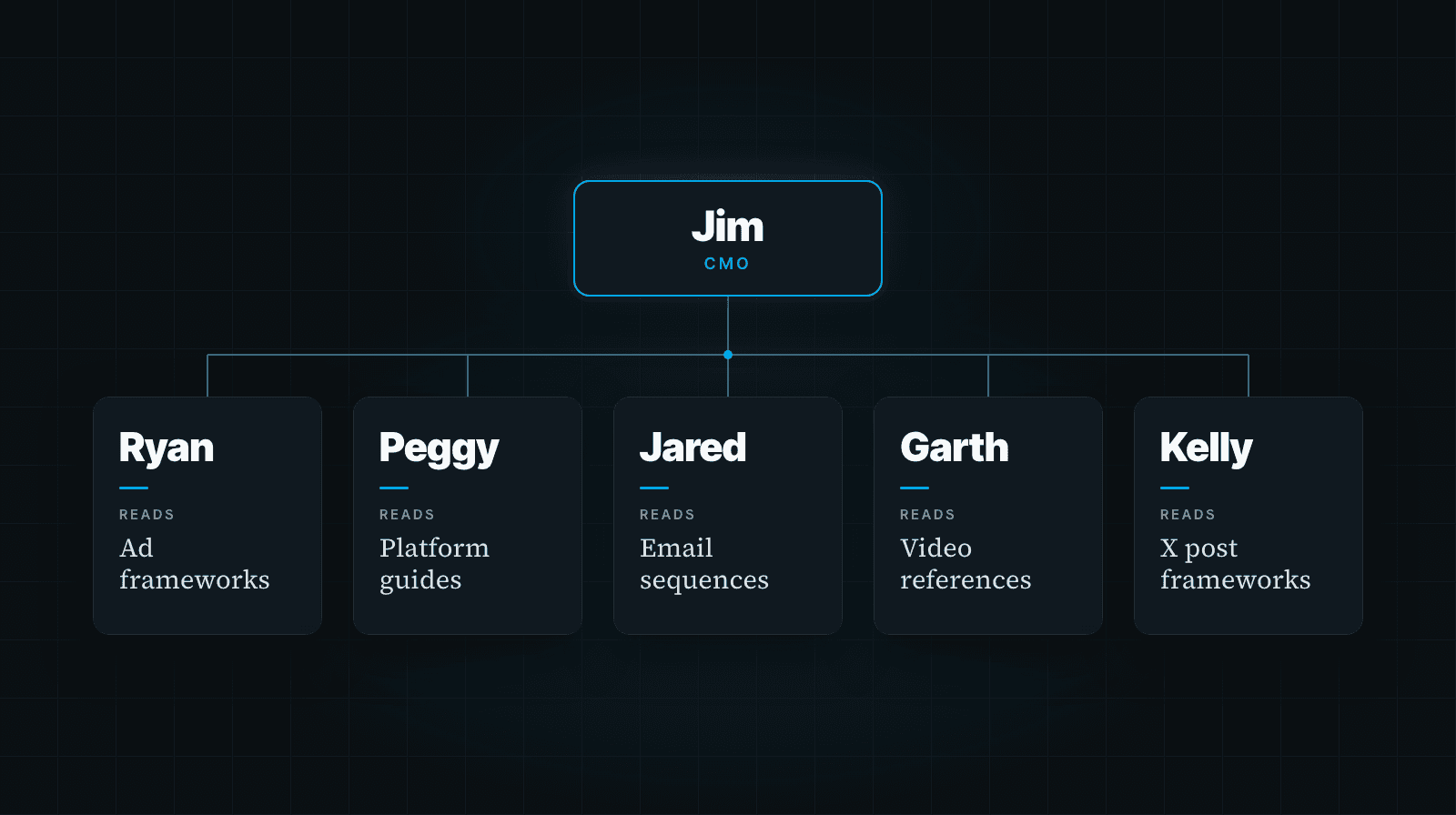
Five of my AI agents handle my ads, emails, sales copy, social posts and video.
They all run on the same platform. The biggest difference between them is the folder each one reads before it starts work.
By the end of this letter you'll have that setup mapped for your own business: your departments, the roles inside them, the 7 files every specialist needs, and a prompt that interviews you and fills those files in. It works with the AI you already use, and you won't be writing any of it from a blank page.
Here's the team. Ryan writes ads. Jared writes emails and sales copy. Peggy writes LinkedIn posts. Kelly writes for X... she started Monday. Garth handles video. They all report to Jim, my CMO agent.
Ryan's folder has ad frameworks, hook formulas and video-ad instructions. Jared's has email sequence guides, story frameworks and sales-copy methods. Kelly's has 14 X post frameworks, a list of creators in my niche, a daily plan and a weekly content plan.
All five also read the shared voice guide. They need to sound like me while doing very different work.
Back in March, I wrote Stop Asking AI Questions. Start Giving It a Job. This is the training that goes with the title.
Because calling an AI your marketing director doesn't give it your marketing methods. You still have to supply those.
Give each role the knowledge its job requires
In The Ultimate Guide To Building Your Agentic Business Brain, I gave you the six files that explain your business and a section on giving each agent its own playbook.
This goes past that playbook section. We're going to map the rest of the company, identify the tools each role touches, and decide where each one has to stop for your approval.
Start with departments: marketing, sales, operations, admin, finance and tech.
Then break down the work inside them. Marketing alone has content, ads, copy, creative and funnel strategy. The funnel builder sits under tech. Those jobs need different instructions, even when the same AI does the work.
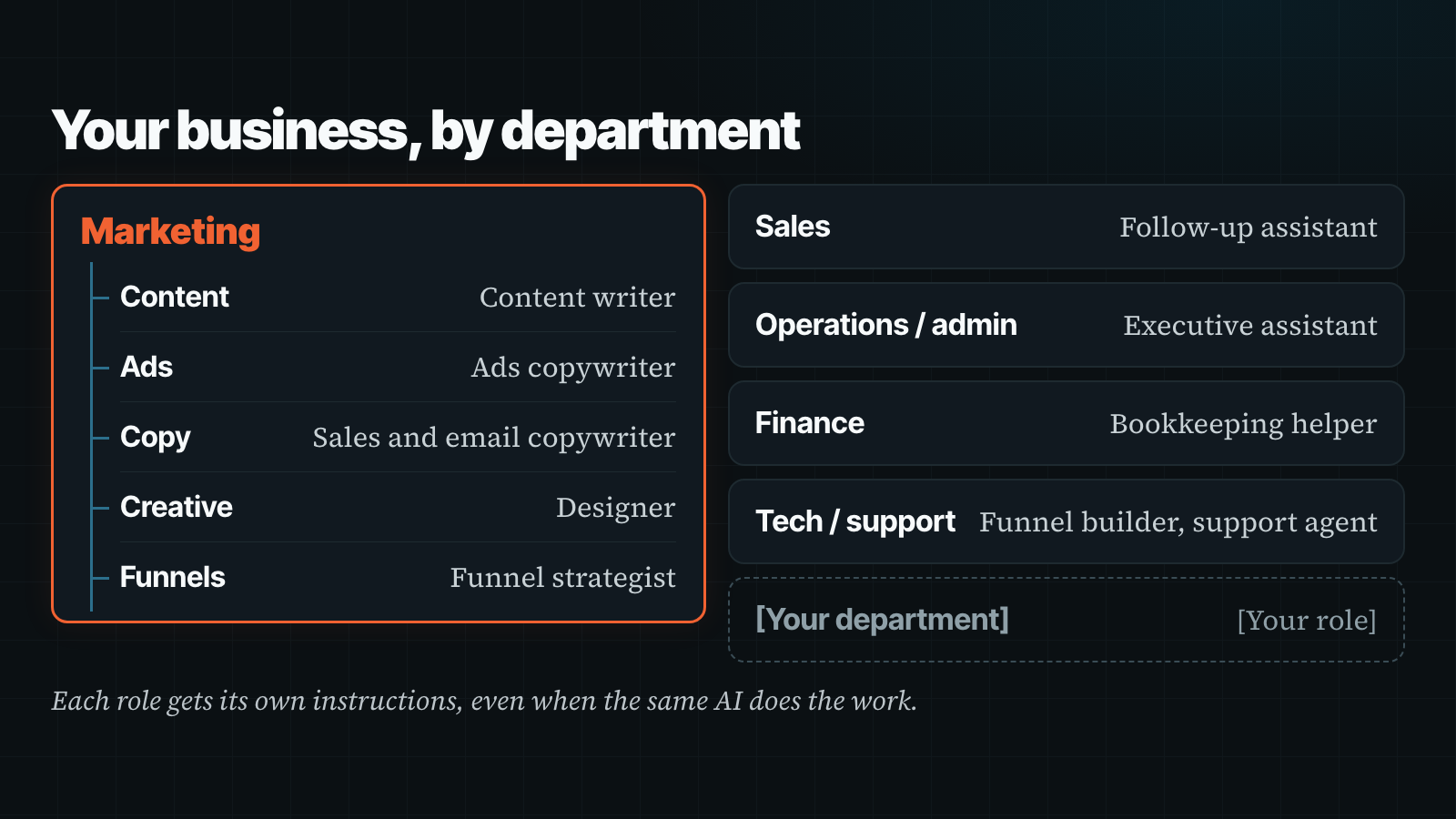
An ads writer needs your hook formulas and rules about claims. A bookkeeping helper needs your expense categories and reconciliation process. A support agent needs your refund policy and a clear point where it passes a ticket to you.
Giving all three your brand voice won't cover that. Neither will telling them to be experts.
Write down the actual work you need done, then give each role the knowledge to do it. You can have one specialist to start. Nobody needs to spend the weekend naming an entire imaginary executive team.
Put the methods, steps and limits in the folder
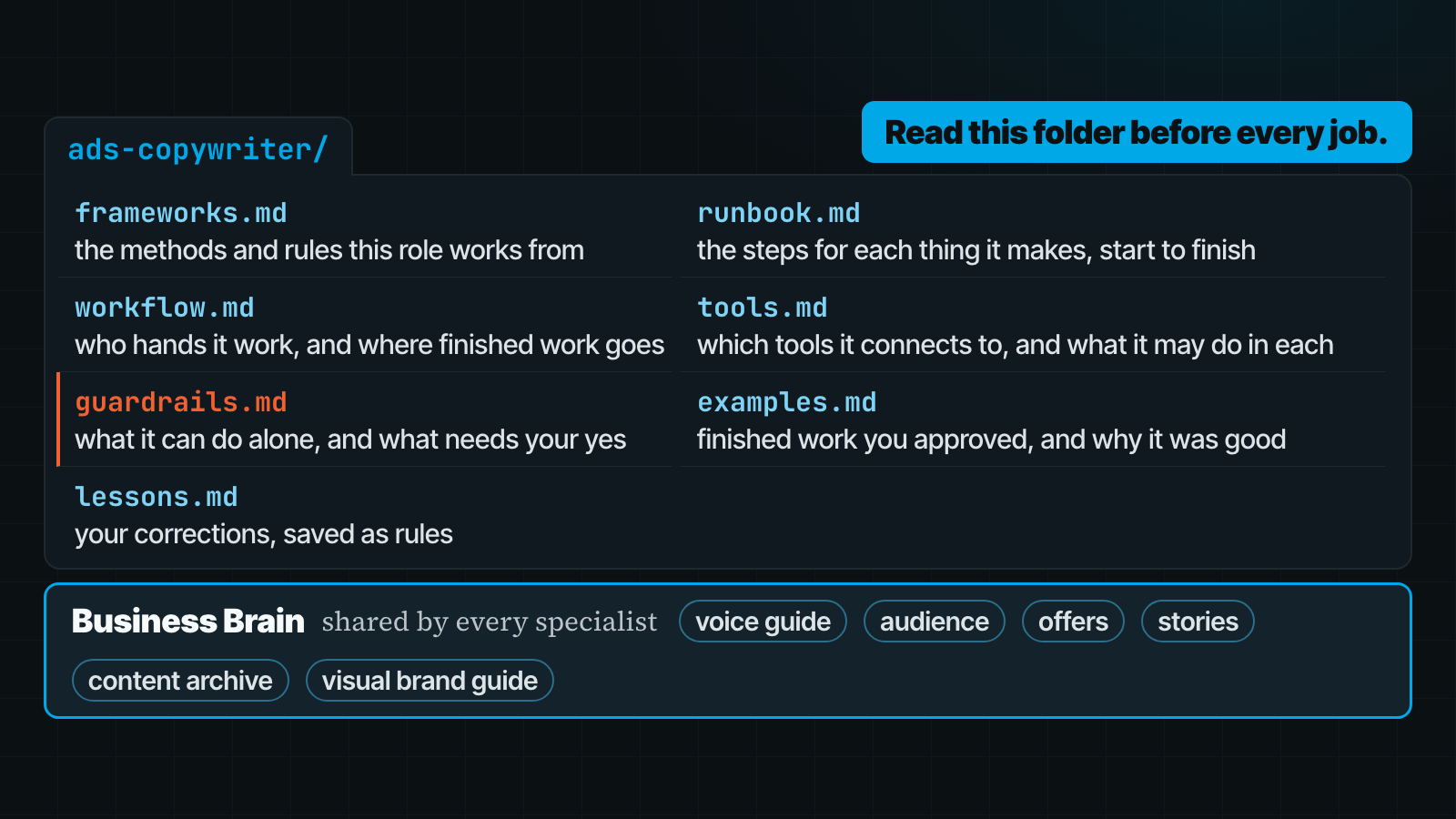
Each specialist gets a folder with seven files. The prompt below will help you fill them, so you don't have to write all this from a blank page.
The frameworks file holds the methods the role works from. Your ad formulas, your offer process, your follow-up rules... whatever guides the decisions inside that job. Use the checklists you already trust.
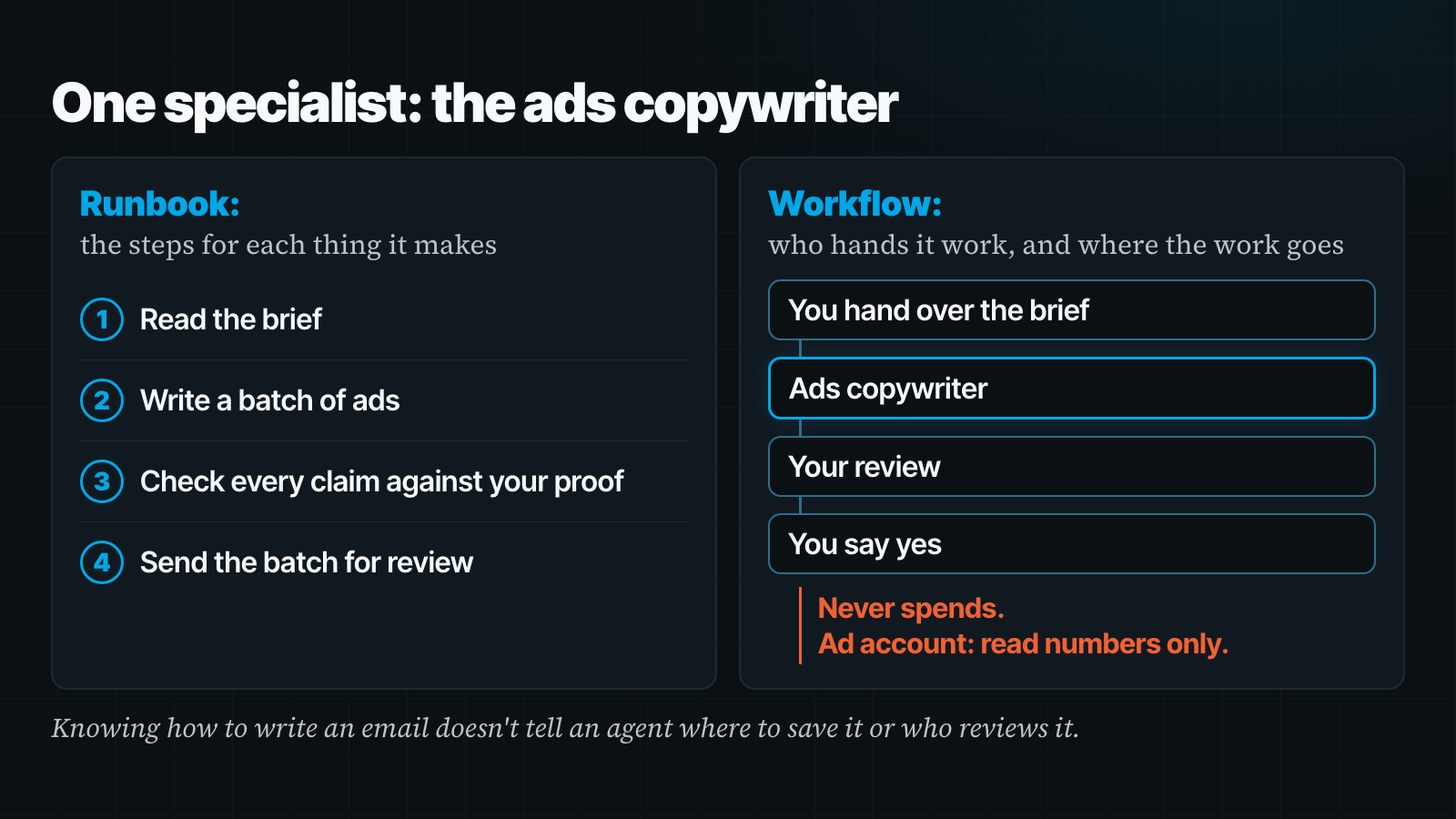
The runbook gives it the steps for each thing it makes, from the request through checking the finished work. The workflow explains who gives it that request and where the result goes next. Those are different instructions. Knowing how to write an email doesn't tell an agent where to save it or who reviews it.
The tools file names what it connects to and what it's allowed to do there. Reading your ad numbers, creating a draft and turning on a campaign are very different levels of access.
The guardrails file makes those limits explicit. Your ads writer can draft ads without having permission to spend. Your assistant can prepare a reply without sending it. Put the stopping point in writing before you connect the tool.
The examples file holds work you've approved, with a short explanation of why it was good. The lessons file holds your corrections as rules for future work.
Tell the agent to read its folder before every job. Otherwise you've created some very organized files that nobody uses. Which is a pretty normal business problem, actually.
Use your existing AI to do the work
In my experience, the ChatGPT and Claude platforms people already pay for can do far more of this work than they're being given. With the right access, they can connect to tools, build pages, create email campaigns, load drafts into a CRM and prepare support answers. ChatGPT and Claude both have agents that can work with your files, like Codex, Claude Code and Cowork.
The operating system is the part they're missing. That's what I've been building into Revenue OS, Video OS, Content OS and Creative OS.
They work with the AI you already use, as long as it can work with your files. A plain chat window can't run these operating systems.
Agentic Operators members install them by copying the setup prompt from their members dashboard into their agent. The agent walks them through setup. After that, they ask for the work in plain sentences.
Run the whole campaign from offer to ads
Ask a plain chat to write a sales page and you've still got to supply the offer, work through the copy, move it into a page builder and get the related emails into your CRM. A page of text leaves a lot of the job on your plate.
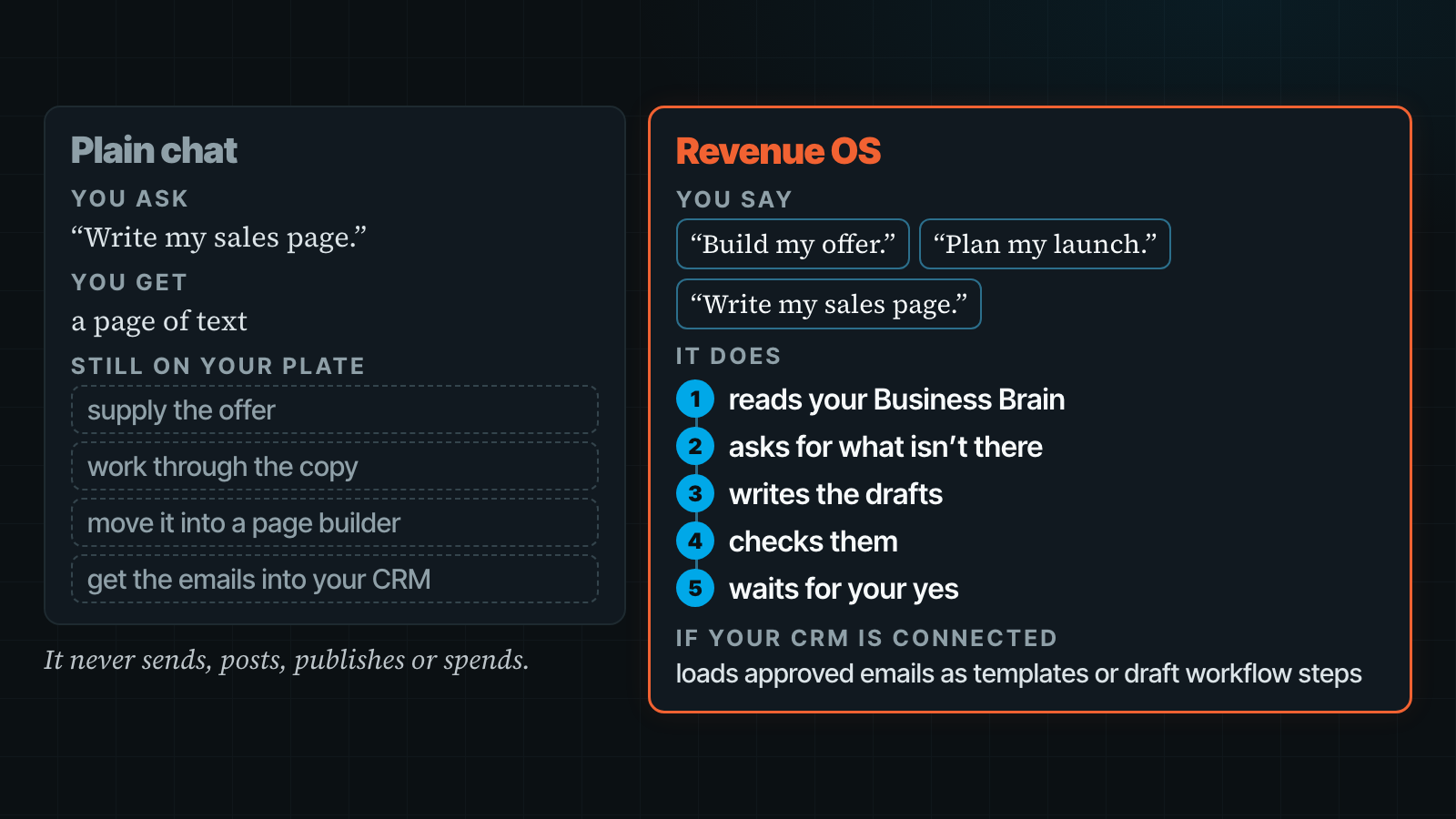
Revenue OS is the marketing department in a folder. It's the most complete IP I have for running a whole marketing team, with methods and runbooks for offers, campaigns, sales letters, pages, webinars, email sequences and ads.
You can say, “Build my offer,” then “Plan my launch,” then “Write my sales page.” It reads your Business Brain, asks for what isn't there, writes the drafts and checks them before waiting for your yes.
The knowledge behind that includes an offer framework, a pricing guide, a video sales letter structure, objection handling and webinar modules from research through delivery.
If your email tool or CRM is connected, it can load approved emails as templates or draft workflow steps. If you add a guarantee or a number to an ad, it checks that claim against what your Business Brain says you can claim.
It never sends, posts, publishes or spends. It does the work. You still say yes before anything goes out.
Make videos by talking, without editing them yourself
A script from a chatbot still leaves you with a video to make. Recording, cutting, captions, changes... the timeline can eat the afternoon even after the writing is done.
With Video OS, I talk to Claude from my phone while it handles that work. My team runs on Grok Bot, but I use Claude for Video OS, and we recommend Claude Code for it. Video runs are long, and agents that charge per task can burn through credits.
Say, “Turn this brief into a video.” It writes the script in your voice and plans the shots against the actual narration timing. Ask for a free preview first. Then leave notes on the review page at the exact second you mean, and it turns those notes into changes.
You don't need to be on camera. You can make a kinetic VSL, a video sales letter with moving text over your voiceover, or have your AI twin present it. You can also ask it to cut a long video into shorts. Every paid step is estimated first and waits for your approved amount.
It replaced my everyday OpusClip, CapCut, Canva, Higgsfield and most of my Descript editing. I still use Descript for the occasional long webinar. The benefit I care about is getting the video made without spending my day editing the damn thing.
Give each platform its own writing instructions
“Turn this newsletter into posts” leaves a plain chat guessing how you want to show up on each platform. Adding “for LinkedIn” to the request only tells it where the post is going.
Content OS has separate framework files for X, LinkedIn, Threads, Facebook and Instagram, plus a hook guide and an AI-pattern library it edits against.
It can take a single idea, a newsletter or a long video and work through the writing process to a newsletter and a week of posts in your voice. There are runbooks for those handoffs, including an X Article.
If your scheduler or CRM is connected, approved posts can load as drafts. You review what goes out. Content OS never publishes, needs no API keys and spends no money.
Make the graphic match the brand and the copy
Creative OS fixes the two things I hated about AI images: garbled words and colors I've never used. Getting a scene you like doesn't help much if the headline is wrong.
It reads your visual brand guide and colors first. The image model draws the scene, and code sets the words, so the typography is exact and a copy change is free.
Use it for newsletter heroes, thumbnails, social images and static ads.
Map one role before you build the whole team
Copy this table into a document. Use the examples to find the job you need, then fill in the blank row for your business.
Pay attention to the tools and guardrail columns. A useful assignment says both what finished work looks like and what the agent may do to get there.
| Department | Role | Frameworks it works from | Runbooks / workflow | Tools it connects to | Guardrail |
|---|---|---|---|---|---|
| Marketing: content | Content writer | Your newsletter structure, a separate guide per social platform, approved past work | Idea to newsletter to a week of posts | Email platform, scheduler (drafts only) | Nothing sends or posts without your yes. |
| Marketing: ads | Ads copywriter | Hook formulas, ad angles, platform ad rules | Brief to a batch of ads to review | Ad account (read numbers only) | Never spends. Claims must match your proof. |
| Marketing: copy | Sales and email copywriter | Offer framework, sales letter structure, email sequence types | Offer to sales page to email sequence | CRM (templates and draft steps) | Never switches on a workflow. |
| Marketing: creative | Designer | Visual brand guide, colors, fonts, image rules | Brief to concepts to final | Image tool | Shows options before paying for finals. |
| Sales | Follow-up assistant | Your follow-up rules, objection answers | New lead to follow-up drafts | CRM | Drafts only until you trust it. |
| Operations / admin | Executive assistant | Your scheduling rules, priorities | Inbox and calendar triage, daily brief | Email, calendar, project tool | Asks before it books or replies. |
| Finance | Bookkeeping helper | Your categories, what counts as a business expense | Weekly reconciliation report | Accounting tool (read only) | Never moves money. |
| Tech / funnels | Funnel builder | Page types, order-page rules | Campaign map to each page | Website or page builder | Private preview first. You publish. |
| Tech / support | Support agent | Your FAQ, refund policy, access rules | Ticket to drafted answer to escalation | Help desk, members area | Escalates refunds and anything it isn't sure about. |
| [Your department] | [Your role] |
Then run this interview for that one role. Have your checklists and approved examples handy. The agent can help you organize what you know, but you'll need to supply the business decisions and judge the result.
Specialist folder prompt
I want to set up one specialist on my AI team. The role is: [role, e.g. "ads copywriter"].

Read my business brain first. Then interview me, one question at a time, to build a
knowledge folder for this role with these files:
- frameworks.md: the methods and rules this role works from
- runbook.md: the steps for each thing this role makes, start to finish
- workflow.md: who hands work to this role, and where finished work goes
- tools.md: which of my tools it connects to, and what it may do in each
- guardrails.md: what it can do on its own, and what needs my yes
- examples.md: finished work I approved, and why it was good
- lessons.md: corrections I give it, saved as rules

Ask me for examples of good work and for the checklists I already use. Do not invent
facts, results, prices or customer details. Mark anything missing for me to fill in.

When the folder is done, show me what's still empty. Then write a short "read this
first" note I can paste into this role's project or custom instructions, so it reads
the folder before every job. Then give the role one small, reversible job so I can
check its work.

No sending, spending, posting or publishing without my explicit yes.
Check the empty parts before you use it. An agent can write a very confident document about a process you haven't actually decided on. Leave those gaps marked until you make the call.
Keep the folder current as you use it
This takes real setup, and the folder needs attention as the job changes.
I still correct my agents. The correction goes in the folder, so I only make it once.
Start with the Business Brain, then train one specialist
If you haven't built the general layer yet, start there. Every specialist needs the facts about your business alongside the instructions for its job.
Grab the free Business Brain. You get it right away, and signing up also puts you on the Agentic Operators waitlist. That's where every operating system in this letter lives.
Get the free Business Brain. Every specialist reads it first.
Pick the one role that makes you redo the most work, run the prompt, hit reply and tell me which role you picked.
Ryan, Jared and Kelly all run on the same platform. Their folders are why they're good at different jobs. Give your first specialist its folder this week.
—Tim Erway

P.S. Kelly's X drafts go to my board for review before anything goes to X. That's the guardrail in practice. She has the specialist knowledge to do the work, and I still approve what gets posted.
P.P.S. Grab the free Business Brain and you're also on the Agentic Operators waitlist.