Today We Build: Set Up Grok Bot and Take Real Work Off Your Plate
Open your computer. We’re gonna give your new bot something useful to do.
Today we build.
By the time you work through this letter, you’ll have a Chief of Staff and a Business Brain, with one or two bots ready to start taking work off your plate.
Start with the inbox you keep putting off, or the customer who needs a Zoom link while you’re trying to run a webinar.
Useful stuff, y’all.
I coordinate everything through a single agent. My Chief of Staff helps figure out what needs to happen and keeps the work moving.
Start there. Give one agent enough information to be useful, then let it help choose the next hires your business needs.
Otherwise you can spend the whole afternoon naming bots and still have the same damn inbox.
Get Grok Bot on your computer.
Go to x.ai/pricing and choose Premium at $30 a month, the cheapest plan with Grok Bot. Super is $100 if you’re building a lot. One plan covers Grok Bot, Cursor, and X.
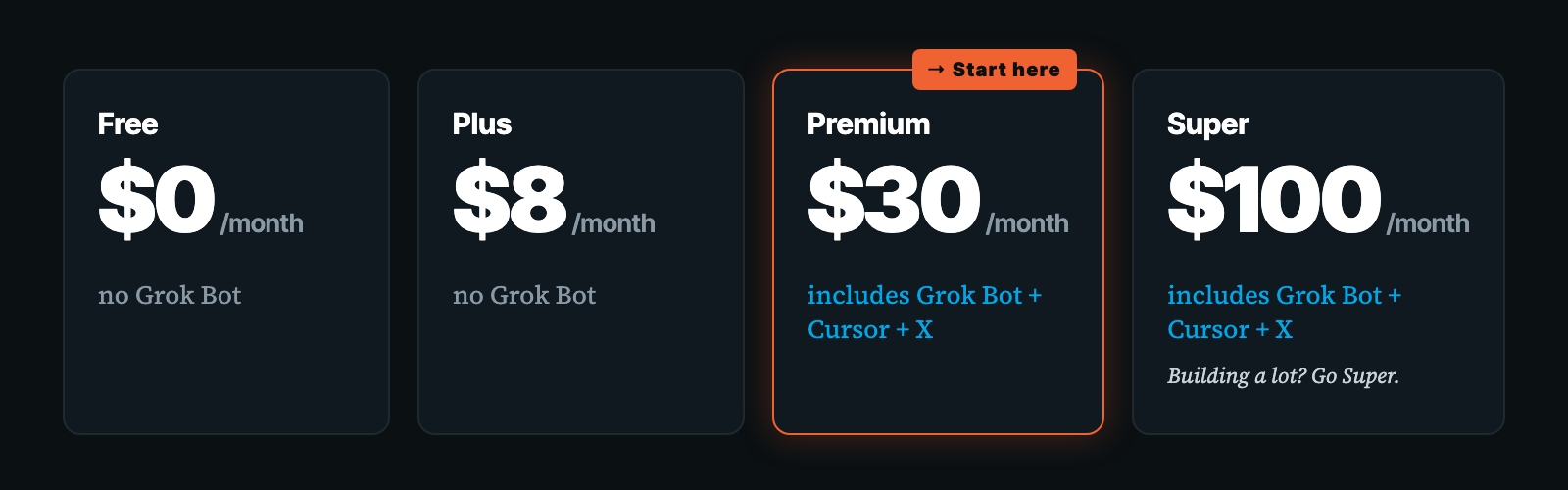
You can see Grok Bot included under Premium in the comparison table.
Next, create your account here.
Then download Grok Bot, open the desktop app, and connect it to your computer.
We’re doing the setup on your computer so the brain lives there. The iPhone app is great for talking to your bot once you’re up and running.
Hire your Chief of Staff first.
Give your bot a name if you want. Just don’t spend longer on the name than the job description.
Paste this into Grok Bot, replacing the bracketed name:
Your name is [YOUR BOT'S NAME]. You are my Chief of Staff.

Help me turn business requests into clear assignments
and get the work through to completion.

Start with the information I provide. Ask when something
important is missing. Do not invent facts about my business.

When I give you a job, clarify the result I need,
what counts as finished, and what needs my approval.

Keep track of assignments, drafts, decisions, and open
questions so I do not have to carry everything in my head.

As we add specialist agents, help define their jobs
and coordinate their work.

No sending, spending, or publishing without my explicit yes.

For now, confirm your role and wait. Next I will give
you my personalized Business Brain setup prompt.
Get your free setup prompt at timerway.com/brain, paste it into your Grok Bot Chief of Staff on your computer, and your Chief of Staff interviews you.
You opt in, get tagged, and get into the members area. Copy the setup prompt there with your key already built in.
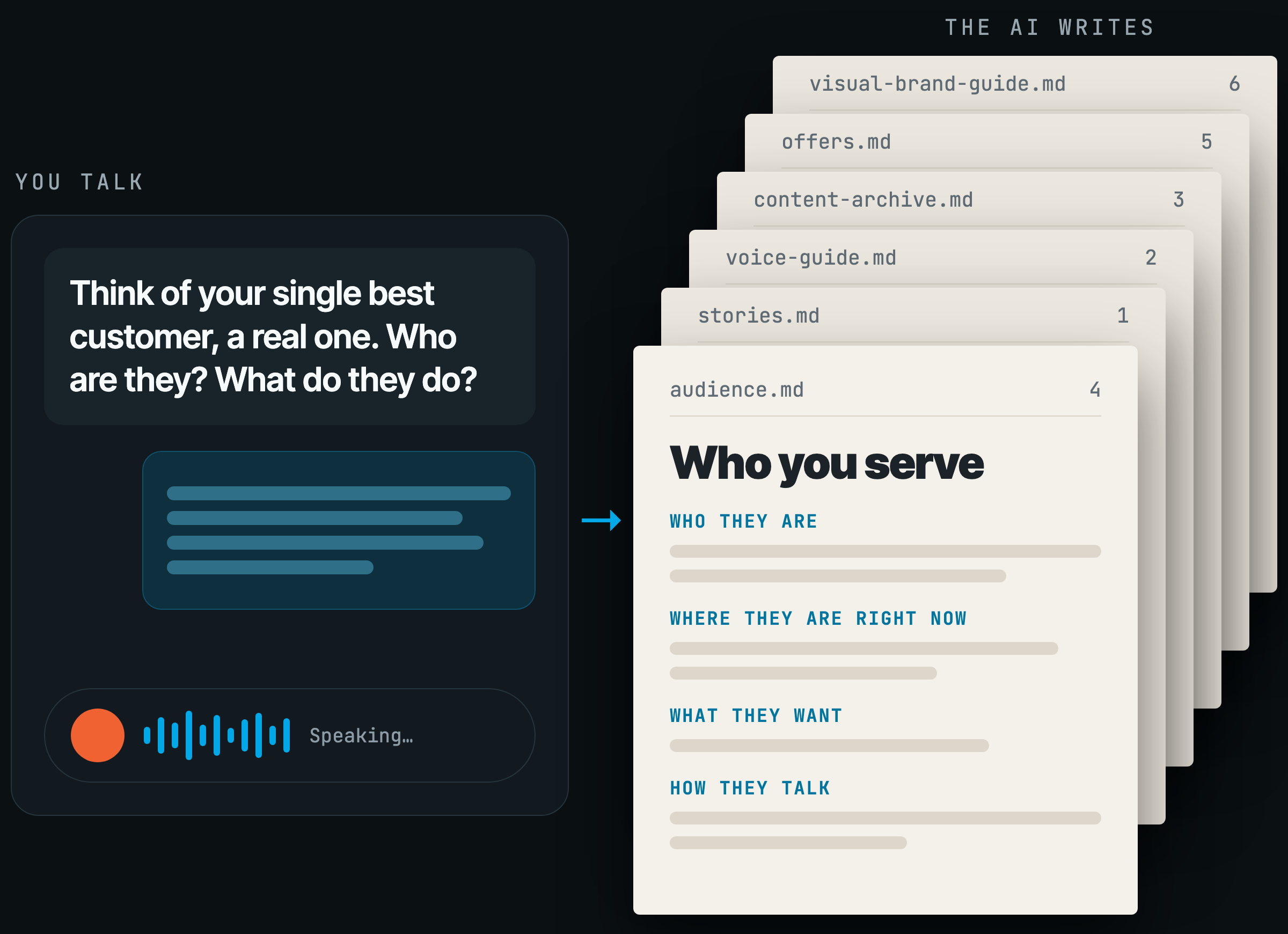
Paste it into your Grok Bot Chief of Staff on your computer. It pulls down the entire Business Brain, scaffolds it on your computer at ~/business-brain, and starts the interview.
That’s a folder called business-brain in your computer’s home folder.
The voice interview gets into how you talk and write, along with your stories. Give it examples you’d put your name on, and explain what sounds wrong.
“Make it more me” gets a lot more useful when there’s something for the bot to read.
The market interview covers your customers and what you sell them.
The visual interview gets your brand preferences down so whoever makes your graphics has more to work with than “I dunno... make it pop.”
The archive interview gathers the existing content you want your agents learning from.
Those four interviews build six files:
brand/voice-guide.mdbrand/visual-brand-guide.mdaudience/ideal-customer.mdoffers/current-offers.mdstories/stories.mdcontent/content-archive.md
Read what comes back and correct anything that’s off. Your bot can follow a bad offer description perfectly. You’ll just get very consistent nonsense.
Now the information your agents need is in a folder you own.
Grok Bot, Claude, ChatGPT, Hermes, and any other agent can read and update the same folder.
You can switch tools without explaining your business all over again.
That’s why we put it on your computer.
I went deeper into this in The Ultimate Guide to Building Your Agentic Business Brain.
Let your Chief of Staff help choose the next hires.
Your next hire should have something worth taking off your plate.
Have your Chief of Staff interview you about where the work is piling up:
[YOUR BOT'S NAME], read my Business Brain.

Interview me to figure out what work I should hand off
and which agents I should hire first.

Ask one question at a time. Cover:
- Recurring activities that eat the most time.
- My biggest current business challenges.
- Work I keep delaying or dropping.
- Gaps in the help I already have.
- The tools and information available for doing the work.
- Which results I can review and judge confidently.

Do not recommend a team until you understand the work.

Then rank my first two or three suggested hires.
For each, explain:
- The role and the specific job it owns.
- Why it deserves priority.
- The information and access it needs.
- A first assignment it can actually complete.
- What must be true for that assignment to count as done.
- Where my approval is required.

Recommend which hire to start with and show me
the job description before setting it up.

No sending, spending, or publishing without my explicit yes.
Give it real answers. “Marketing” doesn’t tell it much. “I’ve got a finished workshop and haven’t followed up with past customers” gives it something to work on.
For content creators, a content assistant can turn an approved recording into drafts for review.
For coaches, a client-prep assistant can prepare a briefing from the notes you provide.
For consultants, a proposal assistant can turn discovery notes into a proposed scope, flagging missing details.
For course creators, a support assistant can prepare answers from approved course material.
Let the interview help you decide. No sense building a whole department around work you don’t have.
Give the CRM bot the follow-up and support work.
My CRM and support bot is Jenny.
She checks support tickets and missed opportunities, communicates with leads and customers, and does the blocking and tackling on support before I see it.
Jenny emailed every past customer about last night’s workshop with a buy link: 3 extra trackable sales.
During the webinar she handled people who couldn’t attend live or couldn’t find their Zoom link.
Somebody needs help finding the link while I’m teaching. Jenny handles that, and I can keep doing the workshop.
Here’s a starting job description for yours:
[YOUR BOT'S NAME], help me set up a CRM and support agent.

Have it read my Business Brain and the approved support
answers, customer information, and offer details I provide.

Interview me about the CRM and support tools I use.
Ask me to connect the accounts needed for the agreed job.

Its job is to:
- Review support requests and identify what needs attention.
- Draft answers using approved information.
- Flag issues that need my judgment.
- Identify missed follow-up opportunities.
- Prepare relevant customer or lead follow-up for my review.
- Keep the customer record and proposed next action together.

Do not invent answers, prices, policies, purchase links,
refund terms, or promises.

Start with a review of the available requests and
opportunities. Show me the priorities and draft replies.

No sending, spending, or publishing without my explicit yes.
Review the recommendations and drafts. You’ll see where the bot needs more information before it can answer well.
If customers keep asking the same thing, give it an approved answer. That’s one less thing it has to bring back to you.
Let the inbox bot bring you the mail that matters.
Connecting Google Calendar and Gmail is two clicks.
The bot can sort spam and routine mail, surface what needs your attention, and draft replies. You review the draft, click approve, and send directly from Grok Bot.
This has saved me a ton of time wading through the BS.
I want to see what needs a decision and whether anything on the calendar is gonna cause a problem. I don’t need my bot lovingly summarizing every promotional email I should’ve unsubscribed from three years ago.
Try this:
[YOUR BOT'S NAME], help me set up an inbox and calendar agent.

Have it read my Business Brain. Ask me to connect Gmail
and Google Calendar and confirm which accounts to use.

Interview me about important contacts, working hours,
meeting preferences, and what needs my personal attention.

Its job is to:
- Separate likely spam and routine mail from important mail.
- Surface messages that need a decision or reply.
- Draft replies in my voice using verified information.
- Review upcoming calendar commitments.
- Flag conflicts and prepare scheduling suggestions.

Keep the briefing short and link to the original items.
Flag uncertainty. Do not invent commitments or availability.

Show me proposed inbox changes before applying them.
Do not create, move, or cancel meetings without my approval.

Prepare replies for approval inside Grok Bot.
No sending, spending, or publishing without my explicit yes.

Start with a briefing and draft replies for my review.
Tell it what deserved your attention and what could’ve stayed out of your way.
If the briefing becomes another pile of stuff to read, tighten the assignment. We’re trying to get some time back.
Give your marketing hires the skills to do the work.
OK, we've got a couple of productivity bots and even a few sales from the CRM bot. But I know what pretty much everyone reading this really wants: help creating offers, sales copy, webinars, email campaigns, and ads.
Hiring agents works a lot like hiring people.
A copywriter needs to understand your business and your customers. They also need to know how to write copy that converts.
Company orientation only gets them so far.
The Business Brain gives them your business knowledge. The specialized operating systems give them instructions and proven frameworks for doing the work.
Revenue OS gives your copywriter more to work with.
Revenue OS is a marketing department in a folder.
It has hundreds of years of combined direct response knowledge, with frameworks from top copywriters and direct response marketers plus my own.
These are the formulas and workflows I use for offers, sales letters, video sales letter scripts, funnel pages, webinars, email sequences, and ads. The included runbooks give the agent steps to follow for each job.
Revenue OS can run in Grok Bot. It reads your brain and asks for what’s missing before working through the assignment. You get drafts to review, with approval required before anything gets sent or published, or money gets spent.
So you can ask it to develop an offer from the expertise and audience information in your brain. Review the offer before moving into the sales copy.
You still make the decisions. You’ve given the copywriter a helluva lot more to work with.
Content OS helps you reach people who might buy.
Content OS can also run in Grok Bot. It takes one video or idea into a newsletter and a week of social posts.
That’s the kind of work my Grok Bot team does with this letter. We work through the draft, then turn approved material into posts that make sense on their own.
Somebody reading a social post should get something useful even if they never click through.
And I still edit.
I’ve given a vague assignment, gotten a vague draft back, and acted disappointed. “Write something about AI” leaves an awful lot for the writer to guess.
Turns out the boss has a job here, too. Annoying little detail.
Creative OS handles the graphics.
Creative OS runs in Grok Bot. It uses your visual brand guide for graphics, including thumbnails and AI-twin images.
For a letter like this, that could be a hero graphic or social card built around the approved idea. It proposes the visual and shows the cost before generating, so you can approve it.
It uses your own image-generation account through fal.ai. The image model draws the scene, and code places the words so the lettering is exact.
“Something with a robot” still needs a little work as a brief.
Video OS is best done in Claude. It takes a brief through to a finished captioned video, including the script and shot plan, with each run estimated and capped.
Design OS runs in Grok Bot, too. It gives the agent your design standard and references before it builds pages and funnels.
Business Brain, Revenue OS, Content OS, Creative OS, Video OS, and Design OS all read the same brain.
Change the offer there, and everyone has the same information to work from.
Give every agent a job it can actually finish.
“Help me grow my business” leaves your Chief of Staff with a lot to figure out.
“Review these support requests, draft the replies you can answer from our approved material, and flag the rest” has an ending. You can look at the work and decide whether it’s done.
Give your marketing hires that same clarity. Ask for an offer to review or a sales letter for a specific program. Tell them what makes it ready for your approval.
I covered more of that in How I Turned My Agents Into People Who Actually Do Things.
The brain is self-improving.
I write new rules all the time. Any agent, Grok Bot included, can read the brain and update it.
New offer, new price, a new story, a voice rule you just figured out: it goes into the brain and every agent gets smarter.
Compare that with four stale voice guides scattered across ChatGPT chats. Eventually you’re searching your own conversations for the time you explained your business correctly.
I’d rather have the answer in the folder.
Start with the brain. Add specialists when you need them.
Agentic Operators brings together Business Brain, Revenue OS, Content OS, Creative OS, Video OS, and Design OS.
The brain is the orientation every new hire needs. It’s free right now.
Get yours built. When Agentic Operators opens, the folks who already have their brain built get to plug in the specialists first.
Get AI to actually know your business.
Go to timerway.com/brain, opt in, and you’ll get tagged and get into the members area. Copy the setup prompt with your key already built in, then paste it into your Grok Bot Chief of Staff on your computer. It pulls down the entire Business Brain, scaffolds it on your computer, and starts your interview.
Do this right now
Go to x.ai/pricing and choose Premium at $30 a month. Choose Super at $100 if you’re building a lot.
Download Grok Bot, open the desktop app, and connect it to your computer.
Paste in the Chief of Staff hire prompt.
Opt in for your free Business Brain. You’ll get tagged and get into the members area. Copy the setup prompt with your key already built in and paste it into your Grok Bot Chief of Staff on your computer. It pulls down the entire Business Brain, scaffolds it on your computer, and starts the interview. Do the interviews and review the six files.
Run the hiring interview to choose the work worth handing off first.
Set up the inbox and calendar bot. Review its first briefing and replies.
Set up the CRM and support bot. Give it real requests and review what it brings back.
Keep this letter open and do the first step.
Let’s leave you with something better than a beautifully named bot and the same damn inbox.

—Tim Erway